Gameplay logic is written using native C++ scripts. Scripts are compiled int the project's script module DLL and executed by the engine during play mode
To access all API functions, include:
All public scripting functions live under Raven::Script. Sub-namespaces map to engine subsystems:
| Namespace | Subsystem |
|---|---|
| Raven::Script::Log | Logging |
| Raven::Script::Scene | Entity/scene queries |
| Raven::Script::Physics | Physics bodies |
| Raven::Script::Renderer | Rendering hints |
| Raven::Script::Random | RNG utilities |
Functions suffixed with _Internal are implementation details and are not part of the supported scripting API. Their behaviour and signatures may change between engine versions without notice.
It is recommended to add
at the top of each .cpp file.
Scripts can be attached through the Scriptcomponent in the editor.
Once attached, the engine automatically creates and manages script instances while the scene is running.
From within the scriptcomponent, use the Script Creation Wizard to create a new script.
The wizard generates a class derived from ScriptBase and performas all required registration automatically.
Scripts receive lifecycle callbacks from the engine.
Public fields can be exposed to the editor. Adding a field such as:
to your class and then adding the Reflection Macro to ScriptEntry.cpp
Once registered, the field becomes editable in the editor and its value is applied when the script instance is created. The initial class reflection gets handled by the Script Creation Wizard.
Each script instance automatically receives the identifier of the entity it is attached to. u64 EntityID
Most scripting API functions operate on this identifier.
For example, to retrieve the entity's tranform component:
Both EntityID and Scene are only valid during Play mode. While there is nothing stopping you from overriding them, it is not recommended to do so and could have unforseen consequences.
Scripts can create entities, search for existing entities, and access + modify their components.
This will create and Entity named "Magic Cube" at (0, 0, 0).
If you now wish to add a Mesh to that object, you may now call CreateMesh with that entity, as follows:
This will load the object based on the provided URI. The engine:// prefix will look for that file in the engine's Resources directory.
If you wish to instead load from your project structure, use project://Assets/path/to/model.
Entities can also be found by name. Use:
Keyboard and mouse input can be queried directly through Raven's input system.
NOTE: This assumes you defined using namespace Raven; somewhere. It is recommended to do so in every .cpp file
The scripting API provides a logging system through Raven::Script::Log.
Logs are displayed in the editor's Log panel and are useful for debugging gameplay code, tracking state, and reporting runtime issues.
The logging system supports formatted strings using {fmt} style formatting
Whether the Log Messages gets displayed/forwarded depends on the log level set in the Raven.ini
As it stands right now, the scripting API is fairly minimal and the entire system might have some quirks here and there. If something stands out, do not fear to ask us directly. This helps improve the API surface and general user friendliness.
The scripting API intentionally exposes native C++ functionality with very few restrictions. Scripts have the same ability to allocate memory, access engine systems, and crash as any other C++ code. If you want to allocate 10 GiB of memory, Raven won't stop you. In fact, we even provide GiB(10) to make it easier to calculate the number of bytes needed. Whether your operating system agrees with that decision is a separate matter.
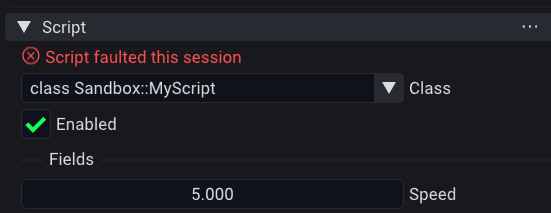
If you crash your script through whatever means, that individual script is excluded from executing until you stop play mode. The script will be flagged as "faulted" in the Properties panel.
 1.17.0